Beyond the Chat Box: The Report Agent — the debrief nobody has time to write

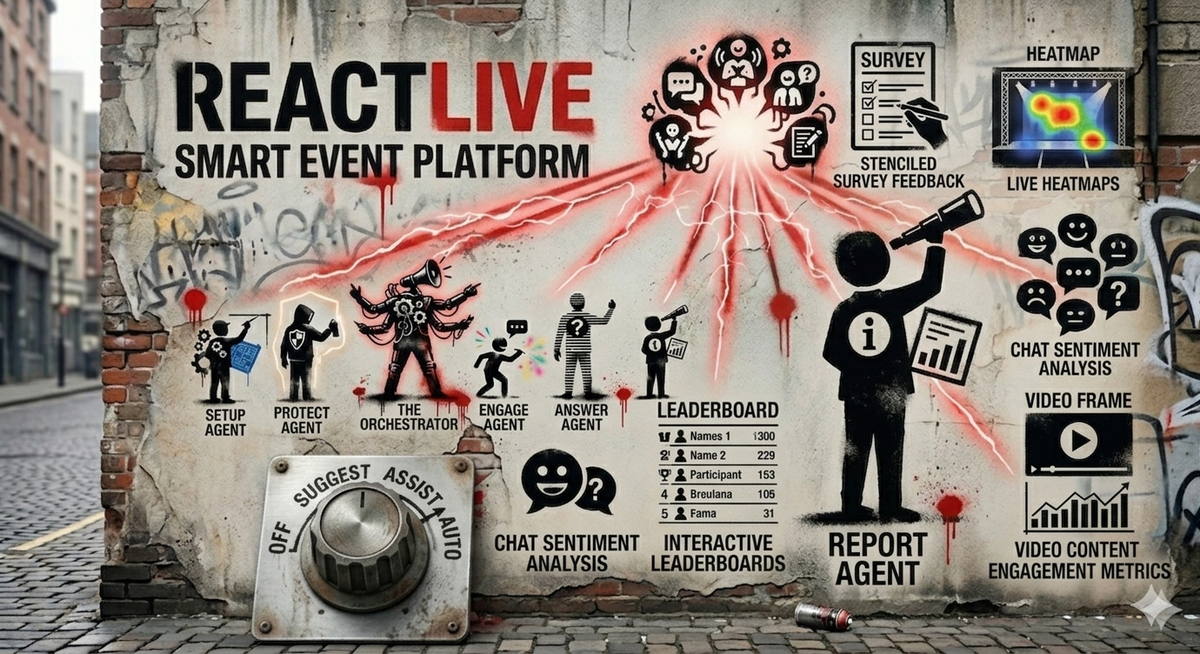
Post eight of a series on what live audience engagement actually looks like when there's an AI team in the room.
The event ends at 11:00am.
The host's calendar has them in another meeting at 11:15. The moderator is on a flight that afternoon. The chief of staff who organised it all has six unread Slack threads from people asking how it went. By Monday morning, the only artefact anyone will look at is a CSV of submitted questions, sorted by upvotes, that nobody opens.
Everything that happened in the room — the questions that landed, the questions that didn't, the topics the audience actually cared about, the moments the energy shifted, the questions that got asked but never answered, the patterns across the previous three town halls — all of it dies in a folder on a shared drive.
This is the standard outcome of a live event in 2026. Not because anyone is lazy. Because writing a real debrief takes hours, and nobody has hours.
The Report Agent is built to make sure those hours aren't the bottleneck.
What "post-event work" actually means
If you've never written a real debrief for an internal event, here's what the work looks like.
Comb through the question feed. Read every submission, including the ones that didn't get answered. Identify themes — what was the audience actually asking about? Were there patterns the host missed in real time?
Cross-reference with the transcript. Did the speaker actually answer the popular questions, or did they answer adjacent ones? Where did the speaker spend the most time vs. where did the audience want them to?
Read the engagement signals. When did submission rate spike? When did it drop? What topic was on screen at each inflection point?
Identify the unanswered questions worth following up on. Not just the ones with high upvotes — the ones that surfaced an issue the leadership team should know about, even if only one person asked.
Write a recap. Headline, key themes, sentiment, top questions, gaps to address, recommendations for the next event.
Distribute it. To the host. To the leadership team. To HR or comms or IR or whoever else needs to know what the audience is thinking.
A thorough version of this is half a day of work. A passable version is two hours. Most events get a fifteen-minute version that's mostly the CSV with a paragraph at the top.
That fifteen-minute version is what the Report Agent is built to replace — not with a worse fifteen-minute version, but with the half-day version, written automatically, before the host has closed their laptop.
What the Report Agent does
The Report Agent runs once, after the event, and produces a structured recap from everything the live agents observed during it.
Five core skills:
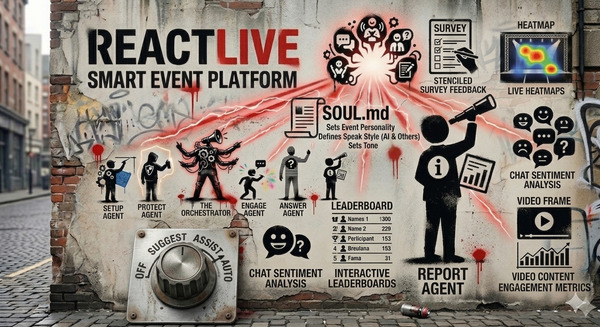
Data aggregation. The agent collects every artefact from the event — the live transcript, the question feed, the polls and their results, the moderator's actions, the engagement signals over time, the prior Q&A that got referenced. This is the substrate. Everything else builds on it.
Insight extraction. From the aggregated data, the agent identifies trends, recurring topics, sentiment patterns, and inflection points. The audience submitted forty questions about hiring; the speaker spent ninety seconds on it. Three submitters phrased the same concern about Q3 guidance differently. Engagement spiked when the CFO mentioned the new product; it dropped when the conversation moved to ops.
Summary generation. The agent writes a recap in the event's voice (defined in SOUL.md) covering what happened, what the audience cared about, and what didn't get addressed. The recap is structured — headline, themes, sentiment, top questions, gaps — so different readers can scan to the part that matters to them.
Audience analysis. Who engaged? When did they tune out? Did engagement vary by topic, by speaker, by phase of the event? The agent surfaces engagement patterns that the host couldn't have seen in real time, even with full attention.
Content highlights. Best questions, key moments, most-upvoted exchanges, the speaker quotes that landed. The output is publishable as a recap to send to the audience after the event — the kind of follow-up that turns a one-time event into a thread of connection over time.
The output is a structured recap that lands in the host's inbox within minutes of the event ending. Not a CSV. A document — readable, scannable, with the patterns surfaced and the gaps named.
The hard rule: facts and interpretations stay separate
This is the rule that makes the Report Agent trustworthy.
Every claim in the recap is one of two kinds:
Facts — direct observations from the event data. 148 questions were submitted. 23% touched on hiring. The poll on remote work returned 67% in favour. Engagement dropped 40% during the segment on operations.
Interpretations — patterns or recommendations the agent infers from the facts. The audience appears more concerned about hiring than the agenda anticipated. The drop in engagement during the operations segment may indicate the topic needs a different framing in future events.
The two are visually and structurally separated in every recap. Facts are presented as data with sources attached. Interpretations are explicitly flagged as inferences, with the supporting facts cited inline.
The reason this matters: a recap that mixes facts and interpretations indistinguishably is a recap that propagates errors. "The audience didn't care about ops" sounds like a fact. It's an inference. Maybe the audience did care; maybe the speaker just covered it badly. The Report Agent will tell you the engagement number; it won't tell you what the engagement number meant unless it can show its work.
This is the same epistemic discipline that runs through the Answer Agent — show your sources, don't generate confident claims you can't ground. The Report Agent extends the principle from live answers to post-event analysis.
What the host actually does with the report
The recap isn't the deliverable. It's the input to the work that comes next.
A well-written recap unlocks four things:
Faster follow-up. The unanswered questions are surfaced explicitly, with confidence about which ones got addressed in the live event vs. which ones genuinely never got an answer. The host can route follow-ups to the right people the same day, not the same week.
Better next event. Patterns across events become visible. The audience has asked about career progression in the last three all-hands. We've covered it once. Worth a dedicated segment. This kind of insight is what separates an organisation that runs town halls from one that builds a real conversation with its workforce.
Real distribution. A structured recap is something the host can forward to leadership, to HR, to the comms team, to the people who couldn't attend. The CSV-and-a-paragraph version doesn't get forwarded. The structured version does.
Audience continuity. The same recap, lightly edited, can be sent to the audience — here's what we covered, here's what we didn't get to, here's what we're following up on. This closes a loop most events leave open: the audience submits questions, the event happens, and they never hear what was done with their input. Closing that loop builds trust over time in a way no individual event can.
The dial, applied to reporting
Report is one of the two agents (along with Setup) that runs once per event, not continuously. The four strength levels apply differently here than they do for the live agents.
Off. No automated report. The host gets the raw artefacts — transcript, question CSV, poll results — and writes their own recap if they have time.
Suggest. The agent drafts a recap and surfaces it for the host to review and edit before distribution. This is the right setting for first events and for high-stakes ones — every published recap has had a human read it.
Assist. The agent generates a complete recap and shares it directly with the host and a defined distribution list (e.g., the chief of staff and the comms lead). The host can edit before further distribution but doesn't have to. The recap goes to people who would otherwise not have seen one at all.
Auto. The agent generates the recap and distributes it according to the configured rules — to the host, to leadership, to the audience as a follow-up email, to the shared drive for archiving. The host can override anything but doesn't have to be in the loop for the recap to land where it needs to go.
The pattern across the dial: more autonomy means the recap reaches more places without human intervention. Even on Auto, the recap is structured, sourced, and clearly marked with what's a fact and what's an interpretation — the agent's epistemic discipline doesn't relax with autonomy.
What the Report Agent does not do
It does not invent insights. If the data doesn't support a pattern, the agent doesn't manufacture one. A flat-engagement event with no clear themes gets a recap that says exactly that. The agent will not produce false depth to make the recap look more impressive.
It does not editorialise. The Report Agent is not in the business of making qualitative judgments about whether the event was "good" or whether the speaker performed well. Its job is to surface what happened and what the audience signals were, not to grade the event. Those judgments belong to humans.
It does not gate-keep follow-up. The recap surfaces gaps and unanswered questions; it doesn't decide which ones are worth pursuing. The host decides what to act on. The agent's job is to make sure nothing important is invisible.
It does not over-summarise. A recap that compresses 148 questions into "audience asked about hiring and Q3 guidance" loses the texture that makes the report useful. The agent surfaces representative samples, names specific submitter concerns where doing so adds clarity, and preserves the granularity the host needs to act.
Why this is the agent that compounds
The other four agents make a single event better. The Report Agent makes the next event better.
That's the distinction worth surfacing. Setup, Protect, Engage, Answer all produce value within the four walls of one live event — they make this town hall safer, smoother, more responsive than it would have been without them. Report's value lands after the event ends, which is why it's easy to undervalue when reading the agent list. Sounds nice. Probably won't bother turning it on for the first few events.
The compounding effect is the reason to turn it on early.
A host who runs ten events a year with the Report Agent on Assist, by event ten, has access to patterns across the previous nine events that no human team would have had time to assemble. The audience consistently engages most with topics that have a concrete next step attached. Anonymous Q&A submission rate triples when leadership has been visible on Slack the week before. Polls land better when they're framed as questions the leadership team is also voting on. These are the kinds of insights that turn audience engagement from a one-off event task into a discipline.
That discipline is the unlock. The Report Agent isn't impressive on day one — its first recap is just a recap. It becomes valuable on day thirty, when the host realises they're running better events because they can see what previous events actually did.
The Report Agent is the agent that closes the loop on the loop. The Auto-Answer Loop runs inside the event. The Report Agent's loop runs across events — and across that longer loop, audience engagement stops being something you do at events and starts being something you build over time.
Next up: SOUL.md — one file for tone, voice, rules, and red lines. The single configuration file that tells every agent what tone to use, what red lines to respect, and when to escalate to a human — and why it's a primitive, not a feature.
Join the waitlist to get early access. Three free events. Locked-in pricing.